AI Chat Drop-In for No-Code Builders: What We Shipped and Why
How we built a drop-in for the Vercel AI SDK that gives AI chat offline recovery and multi-device sync, in one config change.
In early February we shipped @cloudsignal/ai-transport alongside a reference chat app. The premise: if you are building on Lovable, V0, or Bolt, you should be able to add a production-ready AI chat panel to your app by describing what you want. No broker configuration, no WebSocket plumbing, no weekend spent on infrastructure.
Here is what we shipped, why we built it this way, and the tradeoffs we made.
The problem with HTTP streaming for AI chat
When developers add AI chat to an app, they almost always default to HTTP streaming. The Vercel AI SDK makes this friction-free: useChat(), a /api/chat route, and you are live. It works cleanly in demos.
The problems show up in production:
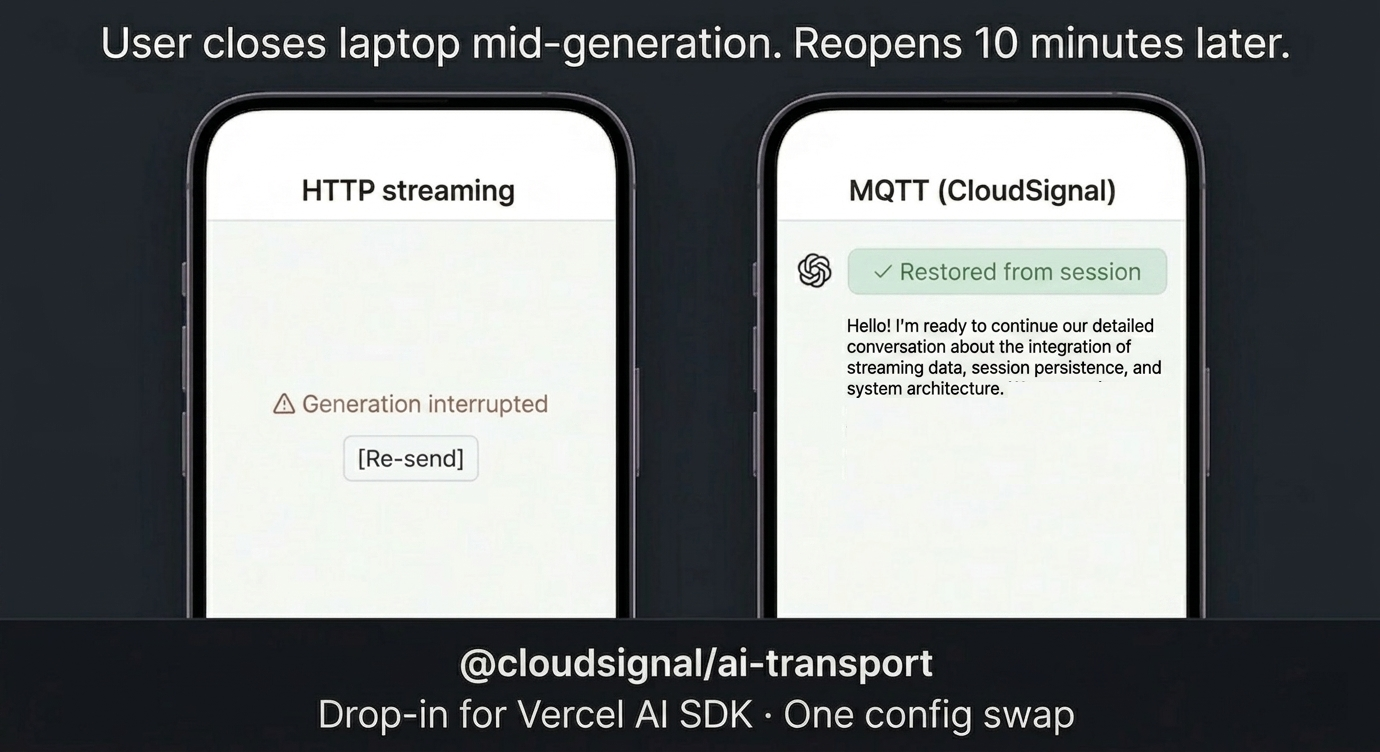
The same scenario, two transports. HTTP streaming is point-to-point, so a closed laptop kills the response and the user gets a Re-send button. MQTT holds the response at the broker and replays it on reconnect, with no application code involved.
HTTP streaming is a point-to-point connection. If the user closes their laptop mid-response, the stream dies and the reply is gone. If they open a second tab or switch to their phone, they get nothing. If you want per-conversation access control, you are writing middleware.
These are not edge cases. Phones lock, laptops sleep, users switch screens. For any app running on real devices, those are the expected failure modes, and they are structural: you cannot fix them inside HTTP streaming because the connection model itself is the constraint.
The drop-in approach
We wanted to solve this without making no-code builders learn a new paradigm.
The Vercel AI SDK ships a ChatTransport interface that lets you replace the default HTTP streaming layer entirely. Swap the transport, keep everything else. The UI code, messages, sendMessage, streaming state. None of it changes.
So we built @cloudsignal/ai-transport: a managed MQTT transport for useChat(). Here is the entire change:
// Before: HTTP streaming (Vercel AI SDK default)
const { messages, sendMessage } = useChat();

// After: CloudSignal MQTT transport
const { messages, sendMessage } = useChat({
  transport: new CloudSignalChatTransport({
    api: '/api/chat',
    authEndpoint: '/api/auth/mqtt',
    wssUrl: 'wss://connect.cloudsignal.app:18885/',
  }),
});
Same hook. Same messages array. Same sendMessage. The delivery layer is now broker-routed MQTT instead of a one-shot HTTP stream. Three lines of config. The properties you get are structural.
The no-code angle
The interesting part is not just the code diff. The full component is pasteable into a Lovable, V0, or Bolt project through a single prompt: chat panel, transport config, and auth endpoint included.
No-code AI builders do not want to understand MQTT protocol details. They want to describe a feature and have it work. A prompt that lands this in a Lovable project looks like this:
Add a real-time AI chat panel to this app. Use CloudSignal's MQTT
transport instead of HTTP streaming so messages are delivered even
when users disconnect and reconnect. The chat should persist across
devices. If I start a conversation on my laptop and open the app on
my phone, I should see the same thread. Use @cloudsignal/ai-transport
with the Vercel AI SDK.
Lovable generates the component, wires up the transport, handles the auth endpoint. What comes out is a chat panel backed by managed MQTT infrastructure. Offline recovery, multi-device sync, and per-conversation access control included by default.
Why MQTT transport over HTTP streaming
Three properties that come with the transport and cannot be added later:
Offline recovery. When a user disconnects mid-stream, the broker holds the response via retained messages. When they reconnect, whether on the same device, a different device, or ten minutes later, the complete response is delivered. There is no equivalent in HTTP streaming. You would need to rebuild and replay conversation state from scratch, if you saved it at all.
Multi-device sync. MQTT is pub/sub at the protocol level. Any number of clients can subscribe to the same topic simultaneously. One AI chat session broadcasts to a laptop and a phone at the same time, with zero additional code. HTTP streaming requires each client to maintain its own independent connection and receive its own independent response.
Broker-enforced access control. Per-conversation ACLs sit at the infrastructure layer, not in application middleware. The broker enforces topic permissions before a message is delivered. A user can only subscribe to conversations their identity is authorized for. This is not something you add as a feature. It is a property of where the enforcement lives.
The reference app
Alongside the package we published a full reference implementation: a Next.js app using the Vercel AI SDK with CloudSignal as the transport. It is the minimal working version of what the Lovable prompt generates. The auth endpoint structure, topic shape, and reconnect behavior are all in the code. If you are building something similar and want to skip the setup, it is the fastest path to a working example.
Try it
This is built for builders who want AI chat that survives the real world: disconnects, multiple devices, per-user security, all without standing up infrastructure to get there.
The three-line swap is the entry point. What you get on the other side is a transport that holds up in production.
Get started with @cloudsignal/ai-transport on npm.
Ready to get started?
Try CloudSignal free and connect your first agents in minutes.
Start Building Free